> ## Documentation Index
> Fetch the complete documentation index at: https://docs.florists.digital/llms.txt
> Use this file to discover all available pages before exploring further.
# Surcharges
> Add an extra delivery charge on your busiest dates, and set whether you take same day orders and what they cost.
Charge more on the days your van is busiest, and decide whether your team can still take an order for delivery today.
**This page covers features gated by Admin-tier permissions** — typically Settings access. Admins have these by default; your administrator can adjust who has them in [Settings > Team](/settings/team).
Go to **Settings** > **General**, open the **Hours & delivery** tab and choose **Surcharges**.
## Busy days
Select a date on the calendar in **Busy days**, or drag across several, then choose **Add an extra delivery charge**. **Add busy days** gives you a blank row to type into instead.
Name the row so your team recognises it, then set the **From** and **To** dates. Put the amount in **Extra per delivery (inc. tax)**. Tick **Every year** and the date repeats, so you set Valentine's Day and Mother's Day up once.
Press **Save busy days** when you're done. The extra goes on every paid delivery option on those dates. Free delivery stays free.
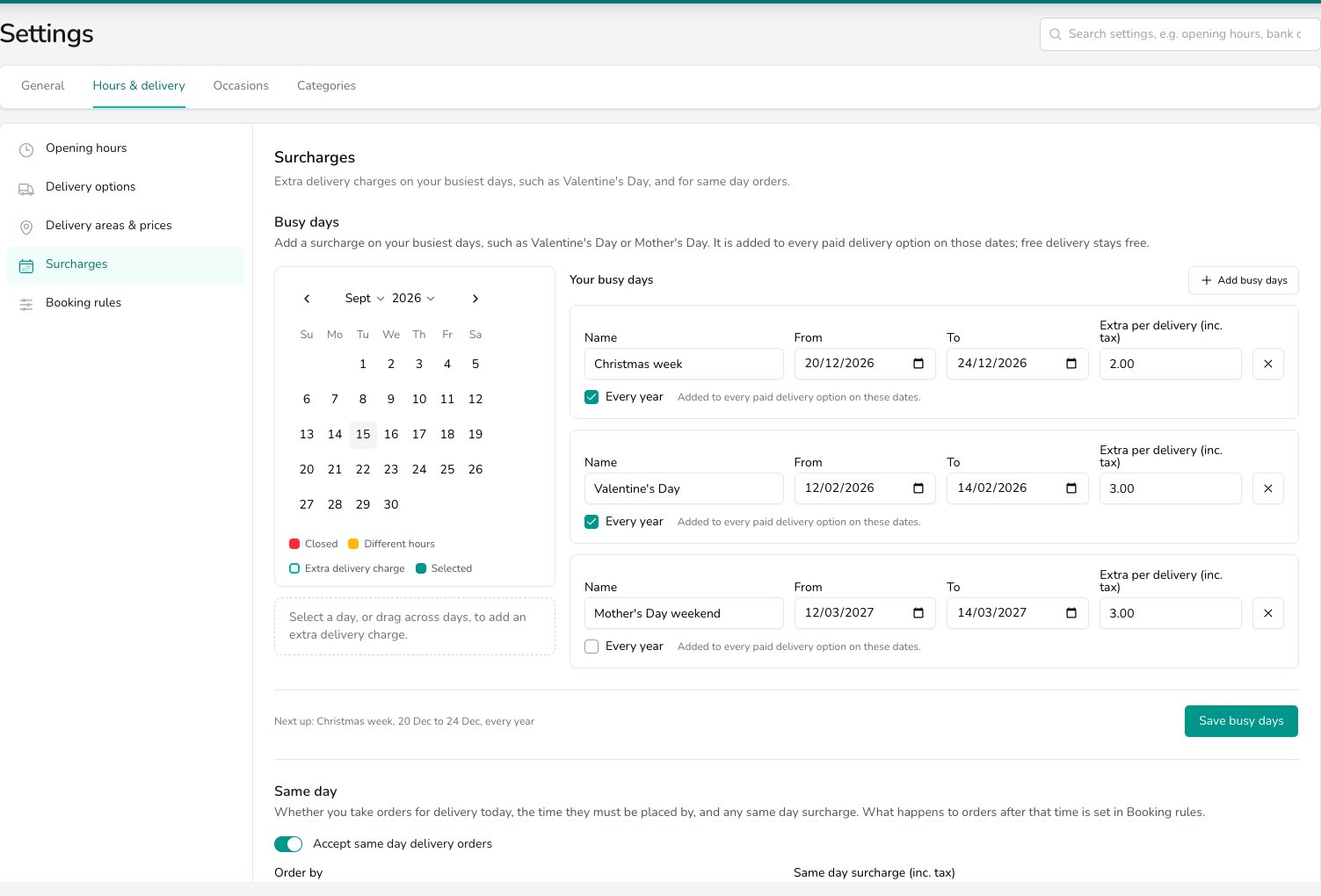 Dates that have passed move into a list of their own, so you can clear them out when the calendar gets crowded.
## Same day
**Same day** decides whether you take orders for delivery today.
* **Accept same day delivery orders** switches it on or off for the shop. Switch it off and your team can't book a delivery for today.
* **Order by** is the time a same day order has to be placed by. One time serves every delivery option. Leave it blank for no deadline.
* **Same day surcharge (inc. tax)** goes on top of the area price for options priced by delivery area.
Dates that have passed move into a list of their own, so you can clear them out when the calendar gets crowded.
## Same day
**Same day** decides whether you take orders for delivery today.
* **Accept same day delivery orders** switches it on or off for the shop. Switch it off and your team can't book a delivery for today.
* **Order by** is the time a same day order has to be placed by. One time serves every delivery option. Leave it blank for no deadline.
* **Same day surcharge (inc. tax)** goes on top of the area price for options priced by delivery area.
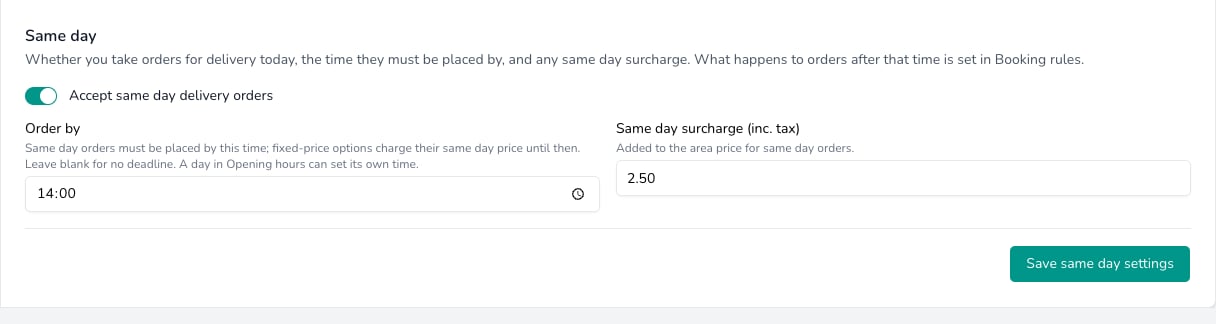 A fixed-price delivery option carries its own **Same-day price (inc. tax)** instead, which it charges up to the **Order by** time. Set that price on the option itself in [Delivery options](/settings/delivery/delivery-options).
To give one weekday its own deadline, put a time in the **Same day order by** column against that day in [Opening hours](/settings/delivery/opening-hours). Leave it blank and that day uses the shop's **Order by** time.
**What happens after the Order by time is a booking rule, not a surcharge.** Whether your team sees a warning or is stopped from taking the order is set in [Booking rules](/settings/delivery/booking-rules).
## Common questions
No. The extra goes on every paid delivery option on those dates, and a free delivery option stays free.
Yes. Both belong to the shop, and you switch shop in the **Set per shop** band. Delivery options themselves are shared, though you can limit an option to one shop.
Its own **Same-day price (inc. tax)**, up to the **Order by** time. Options priced by delivery area take the area price plus the **Same day surcharge** instead.
## What's next?
Weekly hours, closed days and the per-day same day deadline.
The options your team offers and what each one costs.
Where you deliver and what each area costs.
Notice, how far ahead orders go, and what a broken rule does.
See the charges and warnings as you take an order.
A fixed-price delivery option carries its own **Same-day price (inc. tax)** instead, which it charges up to the **Order by** time. Set that price on the option itself in [Delivery options](/settings/delivery/delivery-options).
To give one weekday its own deadline, put a time in the **Same day order by** column against that day in [Opening hours](/settings/delivery/opening-hours). Leave it blank and that day uses the shop's **Order by** time.
**What happens after the Order by time is a booking rule, not a surcharge.** Whether your team sees a warning or is stopped from taking the order is set in [Booking rules](/settings/delivery/booking-rules).
## Common questions
No. The extra goes on every paid delivery option on those dates, and a free delivery option stays free.
Yes. Both belong to the shop, and you switch shop in the **Set per shop** band. Delivery options themselves are shared, though you can limit an option to one shop.
Its own **Same-day price (inc. tax)**, up to the **Order by** time. Options priced by delivery area take the area price plus the **Same day surcharge** instead.
## What's next?
Weekly hours, closed days and the per-day same day deadline.
The options your team offers and what each one costs.
Where you deliver and what each area costs.
Notice, how far ahead orders go, and what a broken rule does.
See the charges and warnings as you take an order.