> ## Documentation Index
> Fetch the complete documentation index at: https://docs.florists.digital/llms.txt
> Use this file to discover all available pages before exploring further.
# Integrations
> Connect Digital Florists to your website, couriers, card processor, relay networks, and Zapier.
**Integrations** connect Digital Florists to the websites, couriers, card processor, and relay networks you already use, so orders, payments, and labels flow between systems without you re-keying anything.
**This page covers features gated by Admin-tier permissions** — typically Settings access. Admins have these by default; your administrator can adjust who has them in [Settings > Team](/settings/team).
Settings shows only the integration categories included with your plan.
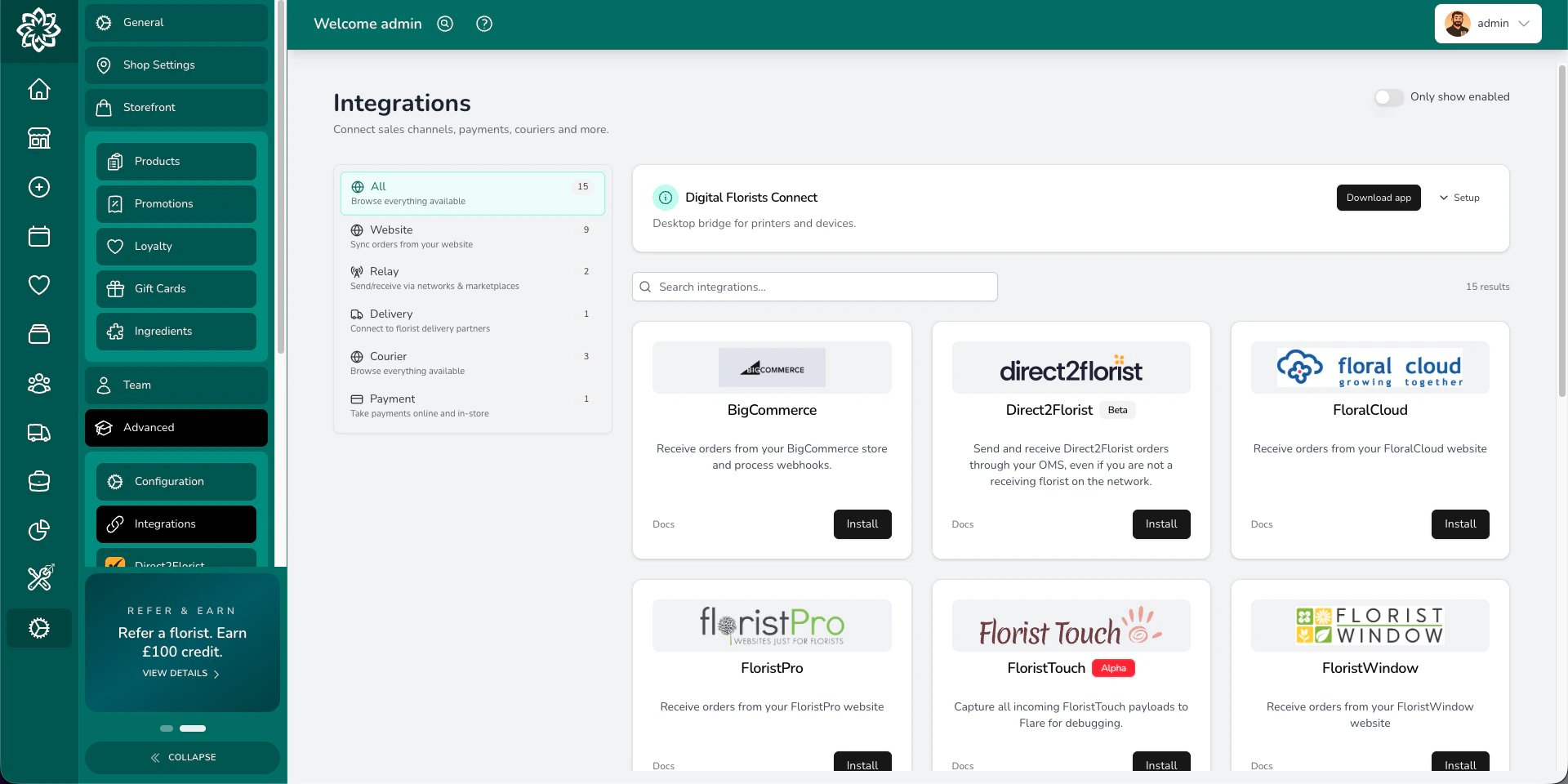
Open **Settings** > **Integrations** to see every integration available to your shop. Each tile shows whether it's on, and clicking through gives you the credentials screen. The pattern is the same across providers: generate an API key (or token, or webhook URL) inside the provider's own dashboard, paste it into the matching field in Digital Florists, save, and use the connection test where one is offered. Some providers, like BigCommerce, register their webhooks automatically when you connect; others ask you to paste a URL on their side.
 ## Which integration do I need?
Pick by what you're trying to do, not by the brand. Most shops only switch on one or two of these.
| If you want to… | Use… |
| -------------------------------------------------------------------------------- | -------------------------------------------------------------------------------------------------------- |
| Receive online orders from your storefront | A **website integration** (Shopify, WooCommerce, BigCommerce) |
| Generate shipping labels and tracking numbers for parcel deliveries | A **courier integration** (Shiptheory or ShipStation) |
| Take card payments online or send a hosted payment link | A **payment integration** (Stripe, Dojo, or Paymentsense) |
| Receive relay orders from other florists or wire services | A **relay integration** (Direct2Florist for the D2F network, Connect for Interflora and eFlorist intake) |
| Send a relay order out to another florist when you don't cover the delivery area | A **relay integration** (Direct2Florist) |
| Push order events into Mailchimp, Google Sheets, Slack, or other no-code tools | The **Zapier** automation integration |
## Categories at a glance
### Website: 10 providers
Pull web orders straight onto your dashboard so they sit alongside phone and walk-in orders.
Providers: **Shopify**, **WooCommerce**, **BigCommerce**, **Ecwid** (limited release), **FloralCloud**, **FloristTouch** (beta), **FloristPro**, **FloristWindow**, **Mals Commerce**.
See [Website integrations](/settings/integrations/website) for the capability matrix, setup, and product-matching rules.
### Courier: 2 providers
Book a label, capture the tracking number on the order, and let the customer's delivery notification carry the link.
Providers: **Shiptheory** (multi-carrier UK and EU aggregator), **ShipStation** (multi-carrier global aggregator via ShipEngine).
Royal Mail, DPD, Evri, ParcelForce, UPS, FedEx, DHL and most other parcel carriers are reached **through** Shiptheory or ShipStation. Your contract with the carrier sits inside the aggregator account, not with Digital Florists.
See [Courier integrations](/settings/integrations/couriers) for the capability matrix and connection steps.
### Payment: 3 providers
Accept card payments for online orders and payment links, and refund a charge from the order screen.
Providers: **Stripe**, **Dojo** (activation required), **Paymentsense** (activation required).
See [Payment integrations](/settings/integrations/payments) for the setup, test-to-live flow, and refund behaviour.
### Relay: 5 providers
Florist-to-florist orders run in two directions, and each direction is set up in a different place.
**Send out** (in **Settings**): **Direct2Florist** for the international D2F network, and **Send to a Friend** (peer-to-peer, limited release).
**Receive in** (via **Connect**): **Interflora** (Florist Hub), **eFlorist**, and **Interflora Spain** — these arrive through the Connect desktop app and have no Settings tile.
See [Relay integrations](/settings/integrations/relay) for how each route is set up and which direction it runs in.
### Automation: 1 provider
Push order lifecycle events out to no-code tools so a new order can fire a Slack message, append a row to a Google Sheet, or kick off a Mailchimp segment.
Providers: **Zapier** (limited release, outbound only).
Zapier is included with Enterprise Orders and Enterprise Complete.
Zapier is set up by creating a Catch Hook in Zapier, copying the URL into the Zapier integration in Digital Florists, and ticking the events you want to push. Zaps react to events from Digital Florists; they can't create orders in your dashboard. Zapier is in limited release; if you don't see the tile, [get in touch](/get-started/getting-help).
## Common questions
No. Connect only the services you use. Each integration is independent, and switching one off doesn't affect the others.
First check [Settings > About](/settings/about), because your plan controls which integration categories are available. Some providers are also in limited release. [Get in touch with support](/get-started/getting-help) if your plan should include the category but the provider still isn't visible.
No. If a web order can't be matched to a product, or a courier label can't be booked, the order appears on your dashboard with a note to action. The customer's confirmation still goes out as normal.
Interflora and eFlorist orders that arrive through the florist hub come in through [Digital Florists Connect](/get-started/connect), the desktop companion app, not through a Settings tile. Outbound Interflora Partner Service orders are configured under **Settings** > **Integrations** with a Florist Number and API key.
## What's next?
Connect Shopify, WooCommerce, BigCommerce, or one of the specialist florist platforms.
Set up Shiptheory or ShipStation to book labels and capture tracking.
Connect Stripe, Dojo, or Paymentsense for online card payments, payment links, and dashboard refunds.
Send and receive florist-to-florist orders through Direct2Florist, Interflora, and eFlorist.
The desktop app behind Interflora and eFlorist intake, label printers, and receipt printers.
## Which integration do I need?
Pick by what you're trying to do, not by the brand. Most shops only switch on one or two of these.
| If you want to… | Use… |
| -------------------------------------------------------------------------------- | -------------------------------------------------------------------------------------------------------- |
| Receive online orders from your storefront | A **website integration** (Shopify, WooCommerce, BigCommerce) |
| Generate shipping labels and tracking numbers for parcel deliveries | A **courier integration** (Shiptheory or ShipStation) |
| Take card payments online or send a hosted payment link | A **payment integration** (Stripe, Dojo, or Paymentsense) |
| Receive relay orders from other florists or wire services | A **relay integration** (Direct2Florist for the D2F network, Connect for Interflora and eFlorist intake) |
| Send a relay order out to another florist when you don't cover the delivery area | A **relay integration** (Direct2Florist) |
| Push order events into Mailchimp, Google Sheets, Slack, or other no-code tools | The **Zapier** automation integration |
## Categories at a glance
### Website: 10 providers
Pull web orders straight onto your dashboard so they sit alongside phone and walk-in orders.
Providers: **Shopify**, **WooCommerce**, **BigCommerce**, **Ecwid** (limited release), **FloralCloud**, **FloristTouch** (beta), **FloristPro**, **FloristWindow**, **Mals Commerce**.
See [Website integrations](/settings/integrations/website) for the capability matrix, setup, and product-matching rules.
### Courier: 2 providers
Book a label, capture the tracking number on the order, and let the customer's delivery notification carry the link.
Providers: **Shiptheory** (multi-carrier UK and EU aggregator), **ShipStation** (multi-carrier global aggregator via ShipEngine).
Royal Mail, DPD, Evri, ParcelForce, UPS, FedEx, DHL and most other parcel carriers are reached **through** Shiptheory or ShipStation. Your contract with the carrier sits inside the aggregator account, not with Digital Florists.
See [Courier integrations](/settings/integrations/couriers) for the capability matrix and connection steps.
### Payment: 3 providers
Accept card payments for online orders and payment links, and refund a charge from the order screen.
Providers: **Stripe**, **Dojo** (activation required), **Paymentsense** (activation required).
See [Payment integrations](/settings/integrations/payments) for the setup, test-to-live flow, and refund behaviour.
### Relay: 5 providers
Florist-to-florist orders run in two directions, and each direction is set up in a different place.
**Send out** (in **Settings**): **Direct2Florist** for the international D2F network, and **Send to a Friend** (peer-to-peer, limited release).
**Receive in** (via **Connect**): **Interflora** (Florist Hub), **eFlorist**, and **Interflora Spain** — these arrive through the Connect desktop app and have no Settings tile.
See [Relay integrations](/settings/integrations/relay) for how each route is set up and which direction it runs in.
### Automation: 1 provider
Push order lifecycle events out to no-code tools so a new order can fire a Slack message, append a row to a Google Sheet, or kick off a Mailchimp segment.
Providers: **Zapier** (limited release, outbound only).
Zapier is included with Enterprise Orders and Enterprise Complete.
Zapier is set up by creating a Catch Hook in Zapier, copying the URL into the Zapier integration in Digital Florists, and ticking the events you want to push. Zaps react to events from Digital Florists; they can't create orders in your dashboard. Zapier is in limited release; if you don't see the tile, [get in touch](/get-started/getting-help).
## Common questions
No. Connect only the services you use. Each integration is independent, and switching one off doesn't affect the others.
First check [Settings > About](/settings/about), because your plan controls which integration categories are available. Some providers are also in limited release. [Get in touch with support](/get-started/getting-help) if your plan should include the category but the provider still isn't visible.
No. If a web order can't be matched to a product, or a courier label can't be booked, the order appears on your dashboard with a note to action. The customer's confirmation still goes out as normal.
Interflora and eFlorist orders that arrive through the florist hub come in through [Digital Florists Connect](/get-started/connect), the desktop companion app, not through a Settings tile. Outbound Interflora Partner Service orders are configured under **Settings** > **Integrations** with a Florist Number and API key.
## What's next?
Connect Shopify, WooCommerce, BigCommerce, or one of the specialist florist platforms.
Set up Shiptheory or ShipStation to book labels and capture tracking.
Connect Stripe, Dojo, or Paymentsense for online card payments, payment links, and dashboard refunds.
Send and receive florist-to-florist orders through Direct2Florist, Interflora, and eFlorist.
The desktop app behind Interflora and eFlorist intake, label printers, and receipt printers.