

This page covers features gated by Admin-tier permissions — typically Settings access. Admins have these by default; your administrator can adjust who has them in Settings > Team.
Plan
The Plan card names your plan, then lists what it includes under Plan features and limits.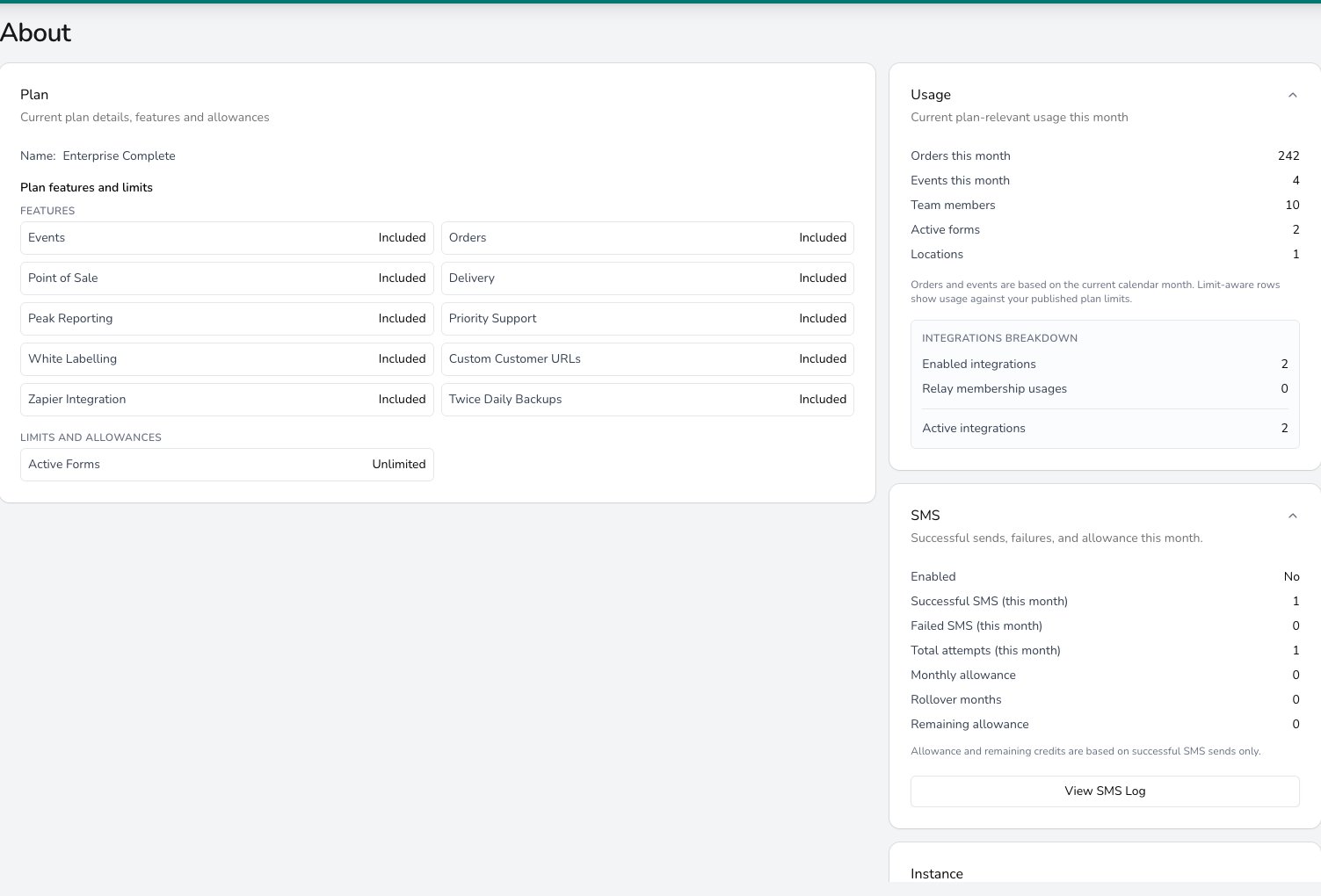
About shows your current plan, its included features, and this month's usage and SMS allowance at a glance.
Usage
The Usage card sums up this calendar month: Orders this month, Events this month, Team members, Active forms and Locations. Where your plan sets a cap, the row shows your usage against it. When you have integrations connected, an Integrations Breakdown underneath counts your enabled and active integrations and any relay memberships in use.Events plan order allowance
Events and Enterprise Events include five manually entered everyday orders per calendar month for each licensed location. On those plans the Usage card shows Everyday manual orders as used against the allowance, Everyday orders remaining, and the next reset date. Event production orders and drafts don’t count against it. For the full counting rules, see how Events and everyday orders fit together. Once the allowance is used, you can still open and manage the everyday orders you already have. To take more, ask support about Complete, which adds Orders alongside Events.SMS
The SMS card shows whether SMS is switched on for your instance, this month’s successful, failed and total send attempts, and your Monthly allowance, Rollover months and Remaining allowance. Failed messages are ones the carrier rejected, such as a bad number. Only successful sends count against your allowance. Click View SMS Log to see each message in the Notification logs. For which notifications go out by SMS and how customers opt out, see Notifications.Instance
The Instance card identifies your Digital Florists instance: your company reference, licensee name, domains and creation date. Include these in any support email or ticket, as they save us asking.Refer a friend
Click Refer & earn in the sidebar. There’s no form to fill in: tell another florist about Digital Florists, ask them to mention your shop when they get in touch, and we run the demo and migration from there. Click Introduce a florist to start a pre-addressed email to us with their details. Each paying signup earns you £100 credit, with no cap and no expiry.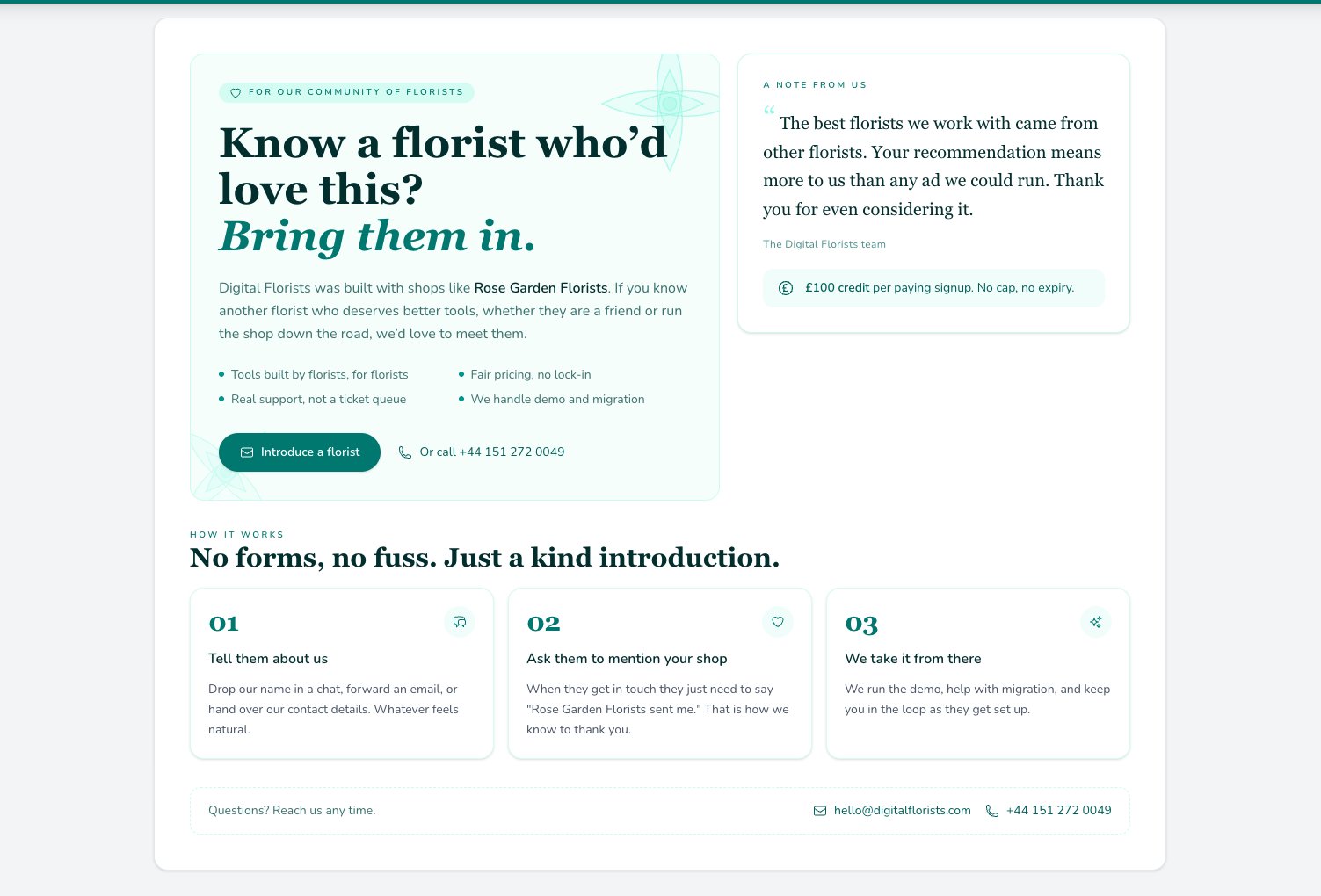
Refer & earn explains the £100 credit and the three-step introduction; there is no form to fill in.
Common questions
Can I change my plan from this page?
Can I change my plan from this page?
No. About is read-only. To change your plan, get in touch with support and we’ll talk through the options.
What happens if I reach a plan limit?
What happens if I reach a plan limit?
The Events everyday-order allowance stops new everyday orders once it is used. You can still manage existing orders and create another when the allowance resets. Other figures are for awareness. If you’re approaching a limit, get in touch to discuss your plan.
Why is my SMS balance lower than I expected?
Why is my SMS balance lower than I expected?
Only successful sends use a credit, so compare Successful SMS (this month) against Total attempts (this month) to see how the carrier is treating your messages. Bad numbers and unsupported regions are the usual reasons for a gap.
What counts as usage in this view?
What counts as usage in this view?
Orders and events created in the current calendar month, plus your team members, active forms and locations. Which rows carry a cap depends on your plan.
What’s next?
Notifications
Configure the customer notifications that use your SMS allowance.
Audit logs
See who’s done what in your instance.
Disaster recovery
Pull a day’s labels, worksheets and order sheets when printing isn’t working.
Getting help
Talk to support, and include your instance details.