

This page covers features gated by Admin-tier permissions — typically Settings access. Admins have these by default; your administrator can adjust who has them in Settings > Team.
The General screen
Open Settings > General and you land on a screen with four tabs across the top. Each tab lists its groups down the left, and the group you pick fills the panel beside it.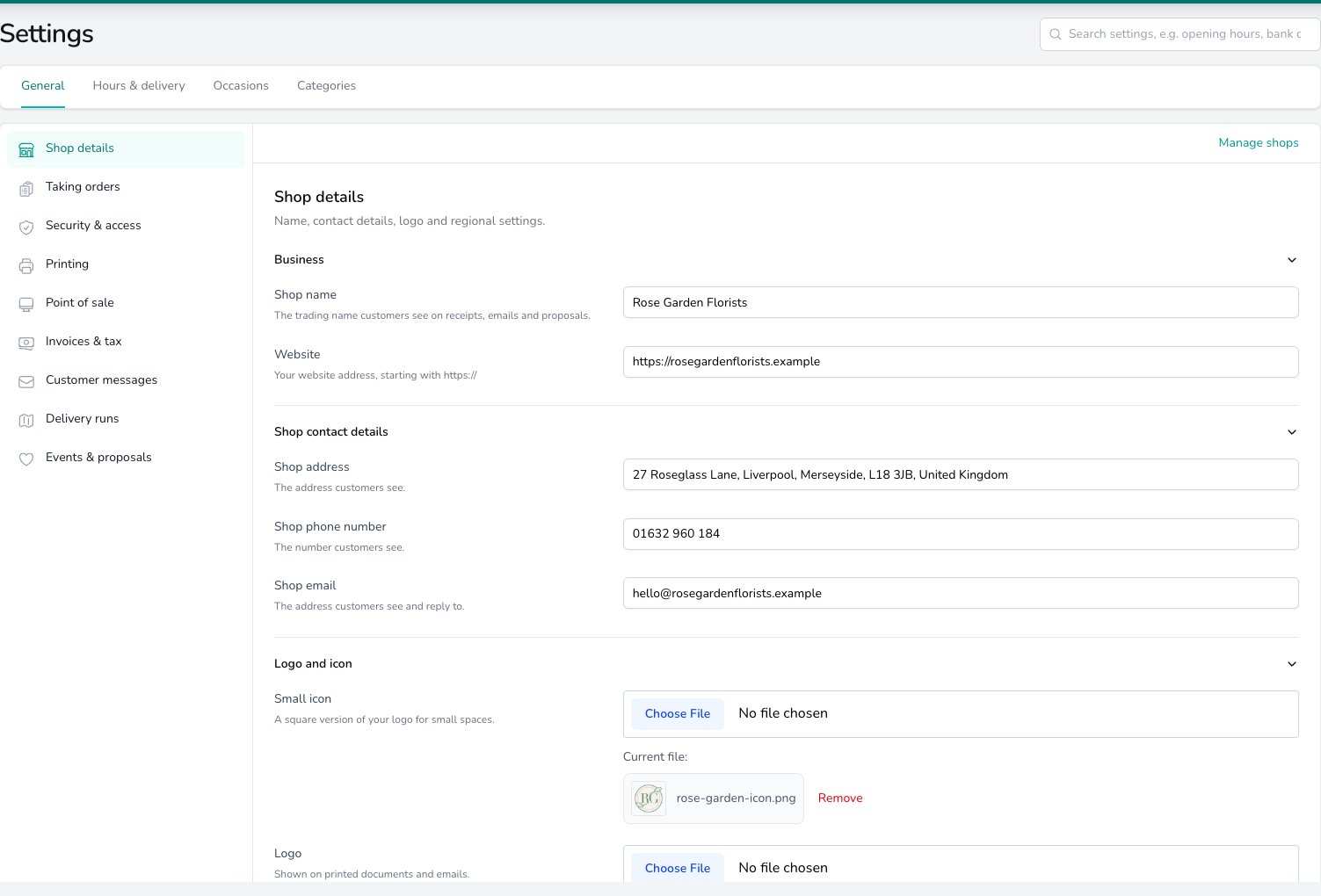
The General screen: four tabs across the top, the General tab's groups down the left, and Shop details open.
You see the groups that apply to your shop, so a shop without the till or without Events sees a shorter list.
Settings on their own screens
The rest of Settings sits on its own screens, reached from the menu under Settings.When you run more than one shop
Settings shared by every shop sit under Shared across all shops. Underneath them, a tinted Set per shop band holds the settings each shop owns, with one button per shop along the top. Press a shop’s button and the band below it swaps to that shop, while the shared settings above stay put. An amber dot on a shop’s button means that shop still has something to set up here. To add, rename or re-address a shop, follow Manage shops from Shop details. See Locations.A sensible setup order
Work through Settings in this order when you are setting up a fresh instance. The first three get you taking orders; the rest can wait until they are flowing.1
Shop details (required)
Set your shop name, contact details, logo, currency, timezone and country. The rest of the docs assume these are filled in. Open Shop details.
2
Hours and delivery (required before your first delivery)
Set your opening hours and closed days first, then your delivery options and delivery areas, so orders can be priced and booked. Start at Opening hours.
3
Team (required)
Invite your staff, drivers and managers. Pick role presets first and fine-tune individual permissions later. See Team.
4
Integrations (optional)
Connect anything outside Digital Florists: your website, a card terminal, a courier or a relay network. See Integrations.
5
Notifications (worth doing early)
Decide which order milestones send an email or text to the customer. Add your own rules in Automations where the built-in messages do not fit. See Notifications.
6
Loyalty and gift cards (optional)
Turn on your loyalty stamp card or start selling gift cards. See Loyalty and Gift cards.
Checking back over what happened
When you are closing out a quarter, answering a query about an old order, or untangling who changed what, two screens help.- Audit logs gives you a searchable record of who did what and when.
- Disaster Recovery pulls every label, worksheet and order sheet for a day when printing or the order flow is not working.
Common questions
Who can open Settings?
Who can open Settings?
Admins have this by default; your administrator can grant the Settings (Admin) permission to other users in Settings > Team.
Do I have to set everything up before going live?
Do I have to set everything up before going live?
No. Shop details, hours and delivery, Team and your Terms of Service are the ones that matter on day one. Most shops are up and running within an hour and add the rest as they go.
A settings link I had bookmarked doesn't open. Where has it gone?
A settings link I had bookmarked doesn't open. Where has it gone?
Find its group in the tables above and follow the link.
What's the difference between Notifications and Automations?
What's the difference between Notifications and Automations?
Notifications are the messages Digital Florists already knows how to send, tied to built-in order events. You turn them on and check the wording. Automations are rules you build yourself with your own triggers, conditions and actions. See Notifications.
What’s next?
Shop details
Your shop name, contact details, logo and regional defaults.
Opening hours
The hours, closed days and delivery set-up orders are booked against.
Team
Invite staff and set permissions.
Integrations
Connect websites, couriers and card terminals.
Notifications
The emails and texts your customers get.
Audit logs
Who changed what, and when.