Choose the setup path for Events or a full flower shop.
Start with the setup path that matches your plan. Events focuses on enquiries, quotations, proposals, event payments, and production orders. Plans with Orders also set up products, everyday orders, delivery, and retail integrations.
Set up Events, then run your first booking from enquiry to event day.
Full-shop setup
Set up products, delivery, payments, everyday orders, and point of sale.
Both paths start with your business details, location, team, tax rates, and payment settings. Events plans also include five manually entered everyday orders per calendar month for each licensed location. See the Events plan boundary.
These five steps get an Orders or Complete shop operational. You can do them in any order, but this sequence makes the most sense.
1
Add your business details
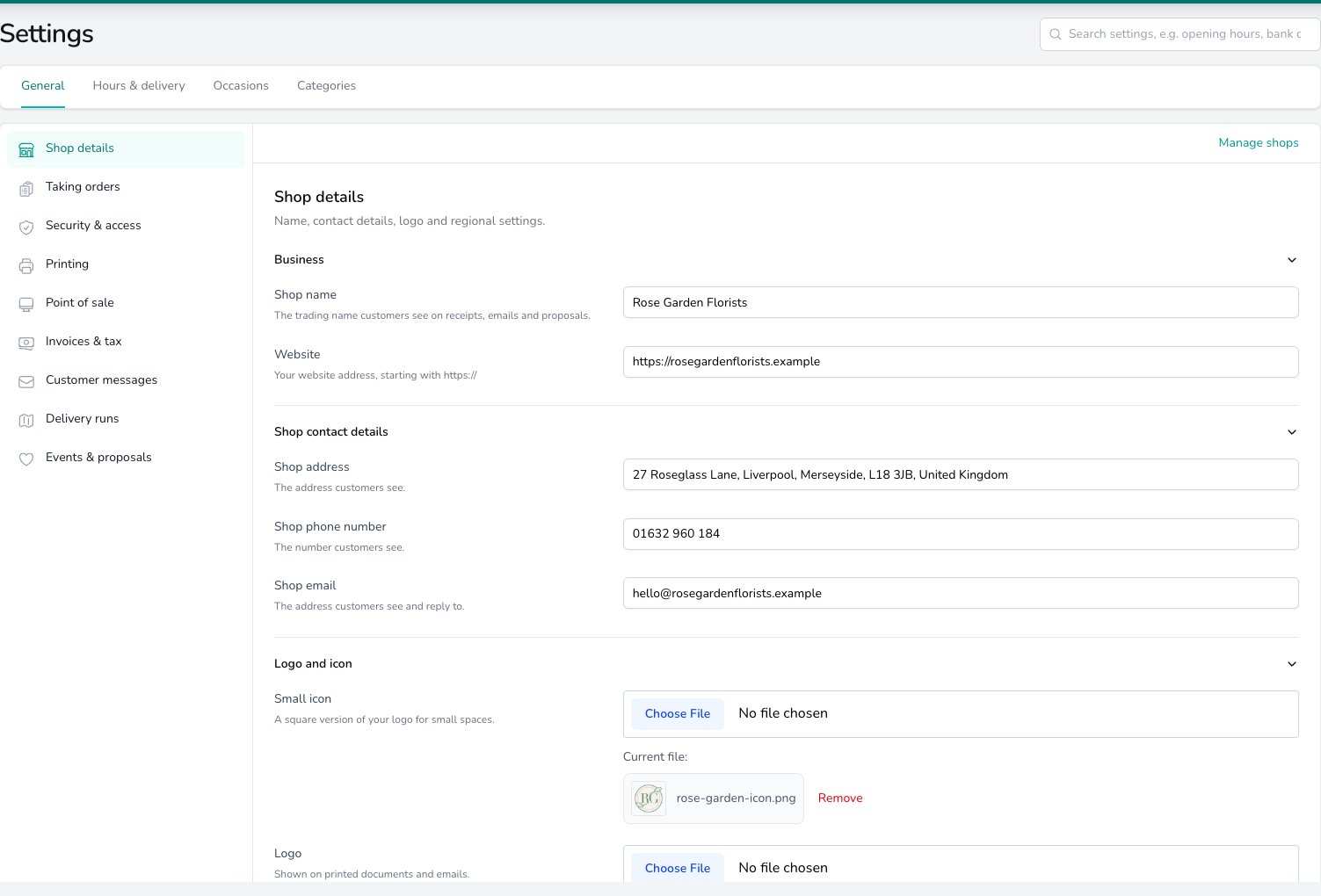
Go to Settings > General > Shop details and fill in your shop name, phone number, and email. Upload your logo. It appears on invoices, receipts, and customer emails.
Shop details
2
Set up your location
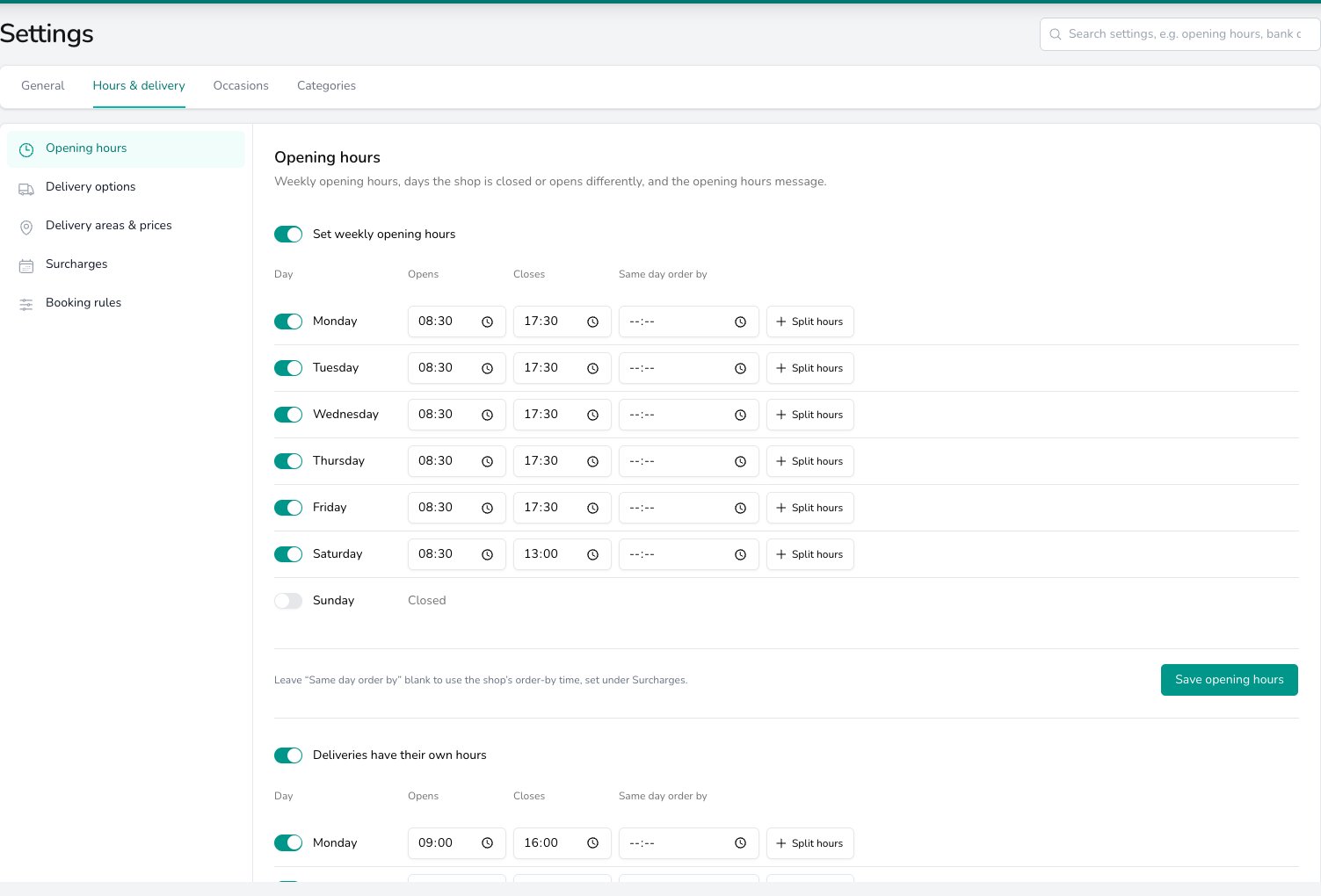
Still under Shop details, enter your Shop address. It’s used for delivery distances and printed on receipts and invoices. Confirm your timezone, currency, and country on the same screen.Set your weekly hours and closed days under Settings > Hours & delivery > Opening hours. See Opening hours.
Opening hours
Digital Florists creates your first location when your account is set up. You just need to fill in the details.
3
Configure delivery
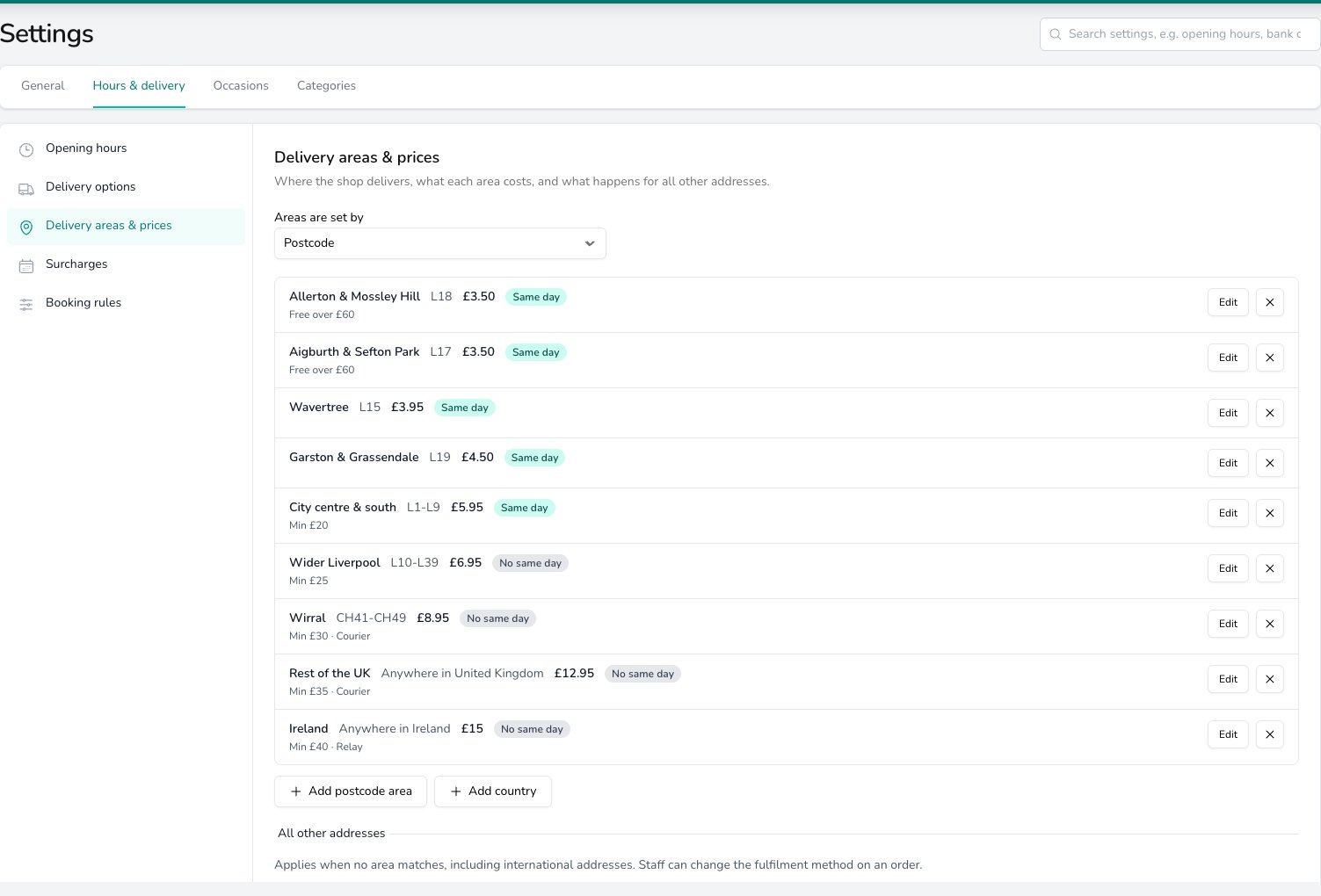
Go to Settings > Hours & delivery > Delivery areas & prices and add the postcodes or towns you deliver to, with a delivery charge for each. Then open Delivery options to check the choices customers see (morning, afternoon, timed) and what each one costs.Same day cut-off times and surcharges live under Surcharges, and your weekly hours under Opening hours. See Delivery areas & prices for the full walkthrough.
Delivery areas & prices
4
Add your first products
Before you add a product, you need at least one category for it to sit in. Go to Settings > Storefront > Products, click Options in the top right, and choose Add Category — add one or two to start (Bouquets, Plants, or whatever fits your range). See Product categories for more on how they work.
Walk-through: adding a category
Back on the same page, click Options again and choose Add Product. Give it a name, pick a category, and select which occasions it’s for (Birthday, Sympathy, etc.).
Walk-through: adding a product
Then add your variants — these are the different sizes you sell, like Standard, Large, and Luxury. Set a price and tax rate for each one.
Start with your 5–10 best sellers. You can always add more later, or import them in bulk from a CSV file. You can also skip this step entirely — when you’re creating an order, you can add custom products to it on the fly, so you don’t need a catalogue to take orders. Build it up at your own pace.
You can take payments from day one — Cash, Card, Bank Transfer, and Account are turned on by default. Review or rename them in Settings > Advanced > Configuration > Payment Methods.
To take online card payments, MOTO payments, or send customer payment links, connect Stripe — or another supported payment provider — later from Integrations.
Go to Settings > Team and click Add Team Member. Enter their name, set a username and password, and choose a role:
Role
What they can do
Admin
Everything a Manager can do, plus full access to settings and team management
Manager
Orders, deliveries, tasks, events, analytics, reports, refunds, invoices, and transactions
Staff
Day-to-day work — viewing and managing orders, viewing tasks and events, and managing deliveries
Driver
Access to the mobile app for delivery runs only
A team member can have more than one role — for example, a florist who also does deliveries can be both Staff and Driver.
These four roles are a starting point. Your administrator can fine-tune permissions per team member in Settings > Team, so what each person sees and can do depends on the specific permissions set for their account, not just the role label. See Team settings for the full role and permission breakdown.
Then have your drivers and florists download the Digital Florists App on iOS or Android — it’s how drivers manage deliveries on the road, and how your team can view orders and mark them ready from the shop floor. Set up the app →
If you have a receipt printer, label printer, or cash drawer, install Digital Florists Connect on your computer. It’s a small desktop app that connects your hardware to Digital Florists.Set up Connect →
On a plan that includes Orders, a supported website integration can bring online orders straight into your dashboard. We’ll usually help set it up during onboarding. If you need to connect it yourself, it lives in Settings > Advanced > Integrations.View all integrations →
Digital Florists can automatically email or text your customers when their order is confirmed, out for delivery, or ready for collection. Go to Settings > Advanced > Notifications to review the templates and turn on the ones you want.Set up notifications →
Most shops are up and running within an hour. The essentials (business details, location, products, delivery) take about 30 minutes. The rest — team, hardware, integrations — can be done over the next few days as you settle in.
Do I need to set everything up before I can take orders?
No. On plans that include Orders, add your business details and a location, then start creating everyday orders. On an Events plan, work through the Events Quickstart; you can also use the five-order monthly manual allowance when you need an everyday order.
Can I import my existing products?
Yes, but you’ll need to use our CSV template — a spreadsheet exported from another system won’t have the right columns.Go to Settings > Storefront > Products and click Import Products. From the import screen, download the Blank Template (or the Worked Example if you’d like sample data to copy from). Fill it in, upload it, and a full preview of every change is shown before anything is saved.For the full walkthrough — including how to handle variants, barcodes, and imports from Shopify or Strelitzia — see Importing Data.
What comes pre-configured?
Digital Florists sets up sensible defaults for you: tax rates, payment methods (Cash, Card, Bank Transfer, etc.), delivery options (Standard, Morning, Afternoon), occasions (Birthday, Wedding, Sympathy, etc.), and order sources (Walk In, Phone, Email, Website). You can customise any of these in Settings.
Do I need a receipt printer to use the POS?
No. If point of sale (POS) is included with your plan, it works without hardware. To print receipts or labels, or open a cash drawer, install Digital Florists Connect and connect your devices.