

This page covers features gated by Admin-tier permissions — typically Settings access. Admins have these by default; your administrator can adjust who has them in Settings > Team.
Where to find it
Go to Settings > Storefront > Gift Cards to see every gift card issued by your shop. Click Edit on a card to view its balance, expiry date, history, message, and internal note.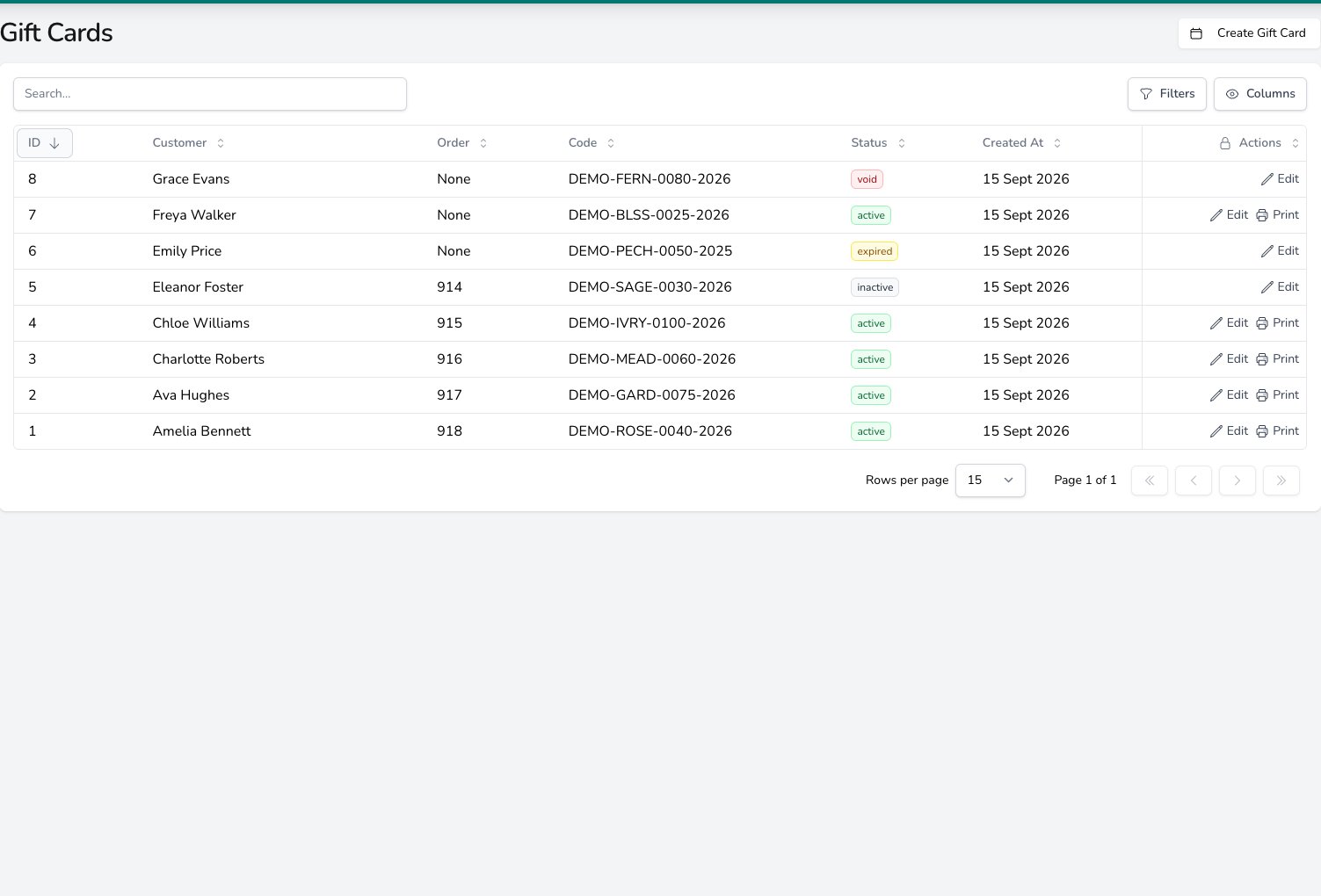
Every card is listed with its status, linked order and code, and active cards can be printed from the row.
Setting up a gift card product
Gift cards can be sold through an order or at the point of sale (POS), like any other product.1
Open the product
Go to Settings > Storefront > Products, then create a product or open an existing one.
2
Choose the product type
Find Product type on the product form. Select Gift card instead of Standard product.
3
Save the product
Finish the product details, variants, and prices, then save your changes.
A gift card is sold at its face value. Promotions and account discounts are worked out on the rest of the basket and skip gift card lines, so a customer on a 10% account discount still pays £50 for a £50 card. A gift card product also can’t be handed out as a promotion’s free item.
Flagging products in bulk
Use the optional Product Kind column in the product import to update several products at once. Entergift_card to mark a product as a gift card. Once a product has been sold its type is locked, so duplicate the product if you need to change it.
When updating products, leave the cell blank to keep its current value. Enter __CLEAR__ to remove the gift card setting, matching the behaviour of other optional import columns.
Issuing a card manually
Click Create Gift Card on the Gift Cards page to issue a card without a sale. Choose a preset balance or Custom, then optionally attach a customer, internal note, and personal message. Every card has a unique 16-character code, displayed asXXXX-XXXX-XXXX-XXXX, and a 4-digit PIN. The customer needs both to redeem it.
Setting the expiry period
Go to Settings > General > Taking orders and open the Products & gift cards card. Enter the number of days a new card stays valid in Gift cards expire after (days). Cards start on 365 days. Enter0 or leave the setting blank to issue cards without an expiry date. Changing this setting does not change cards that have already been issued.
Redeeming a gift card
Gift cards can be used for payments at the POS and on orders in the dashboard.1
Choose Gift Card
Start the payment and choose Gift Card as the payment method.
2
Look up the card
Scan or type the 16-character code, then enter the 4-digit PIN. Dashes in the code are optional.
3
Apply the payment
Check the balance and apply the amount the customer wants to redeem.
A successful lookup unlocks that card for one payment on that till. The unlock expires after 15 minutes, so look the card up again if the payment is not completed in time.
Refunding a gift card payment
Refunding a gift card payment credits the refunded amount back to the original card. If several gift cards funded the payment, Digital Florists allocates the refund across those original cards.Managing the card lifecycle
You can manage these statuses from the card’s details page.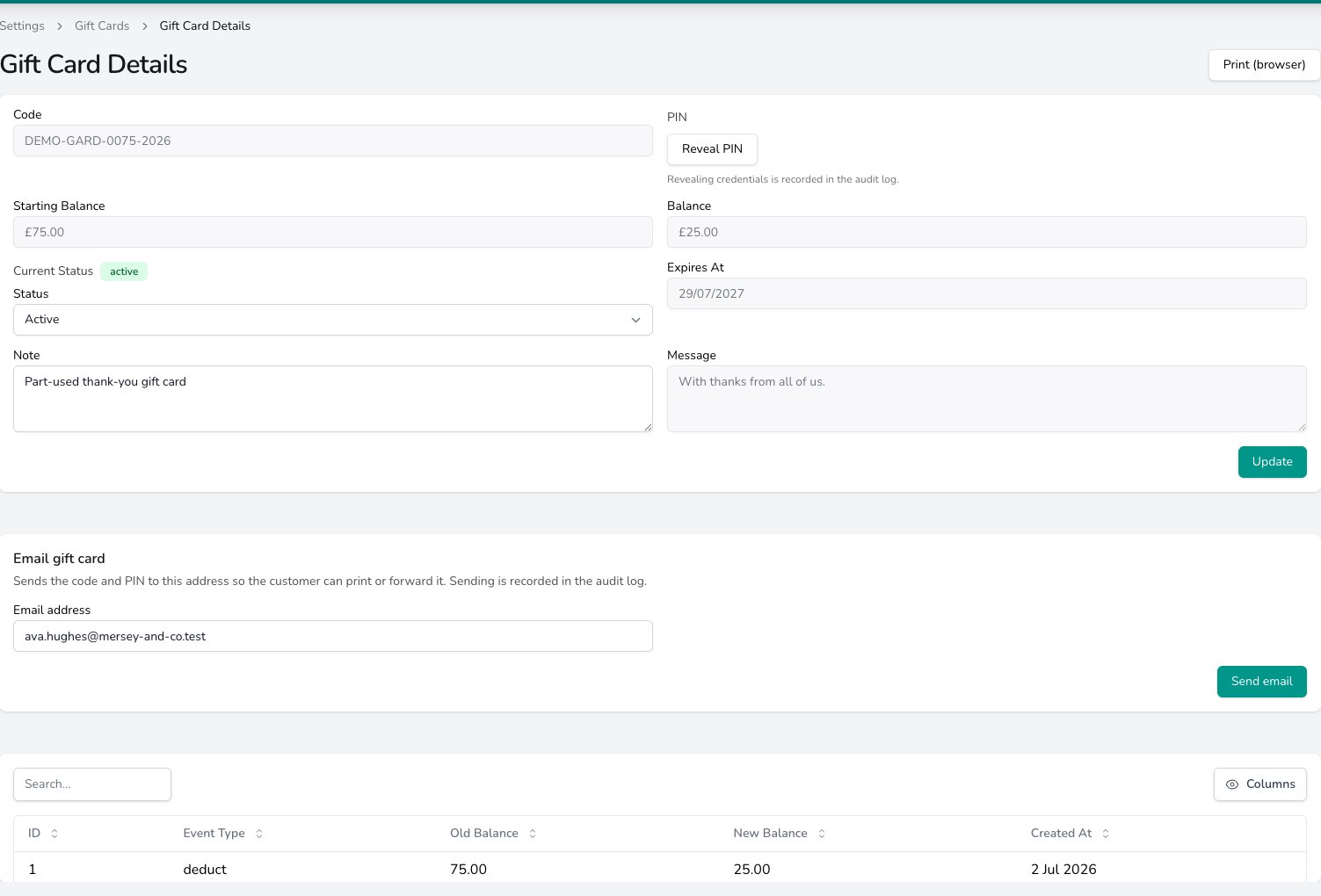
Change a card's Status here, and read the balance before and after every deduction or credit in the table underneath.
When an active card passes its expiry date, it shows as Expired (automatic) and is refused at payment.
Changing an order that has issued a gift card
Once a card has been issued for a line on an order, that line is fixed. Removing it, changing its price, or reducing its quantity is refused with:A gift card has already been issued for this product, so the line cannot be removed, repriced or reduced. Refund the payment from the transaction screen to cancel the card, or void the card under Settings > Gift Cards.There are two ways forward.
- Refund the payment that bought the card, from the order’s transaction. Refunding it in full while the balance is untouched cancels that card and it shows as Void. If some of the balance has already been spent, or you refund only part of the payment, the card is set to Inactive instead.
- Void the card from Settings > Storefront > Gift Cards. Open the card and set its status to Void.
Printing gift cards
Print a card from the Gift Cards page, or include issued cards when you print an order’s labels or worksheet. If one order contains several gift cards, each print is numbered 1 of N, 2 of N, and so on. Gift card labels use their own text size, not the shop-wide Label Message Font Size, and follow your Label Message Font setting. The customer’s message prints on its own message label with the rest of the order, not on the gift card label. When Digital Florists Connect is running, you can send the card directly to your configured receipt or label printer.The success message confirms the card was sent to the printer, not that it came out, so check the printer before handing the card over. A card occasionally prints twice, and a reprint shows the card’s current remaining balance.
Selling gift cards on your website
Common questions
Can a gift card be used across multiple orders?
Can a gift card be used across multiple orders?
Yes. Take only the amount needed for the current payment. Any remaining balance stays on the card for another order.
What happens when a gift card expires?
What happens when a gift card expires?
It shows as Expired (automatic) and cannot be redeemed. Expired cards also cannot accept a refund credit.
How do I give the code and PIN to the customer?
How do I give the code and PIN to the customer?
Print cards issued from a paid order with the order’s labels or worksheet. For a manually issued card, print it from the Gift Cards page.
Can I sell gift cards on my website?
Can I sell gift cards on my website?
Yes, when your website integration matches the item to the gift card product in Digital Florists. Shopify supports this when the product codes match.
What’s next?
Products
Create and manage the products you sell as gift cards.
Point of Sale
Sell and redeem gift cards at the till.