

This page covers features gated by Admin-tier permissions — typically Settings access. Admins have these by default; your administrator can adjust who has them in Settings > Team.
Linking with another florist
Both shops need to be on Digital Florists. Open Settings > Advanced > Send to a Friend and you’ll see your shop’s 6-character code under Your code.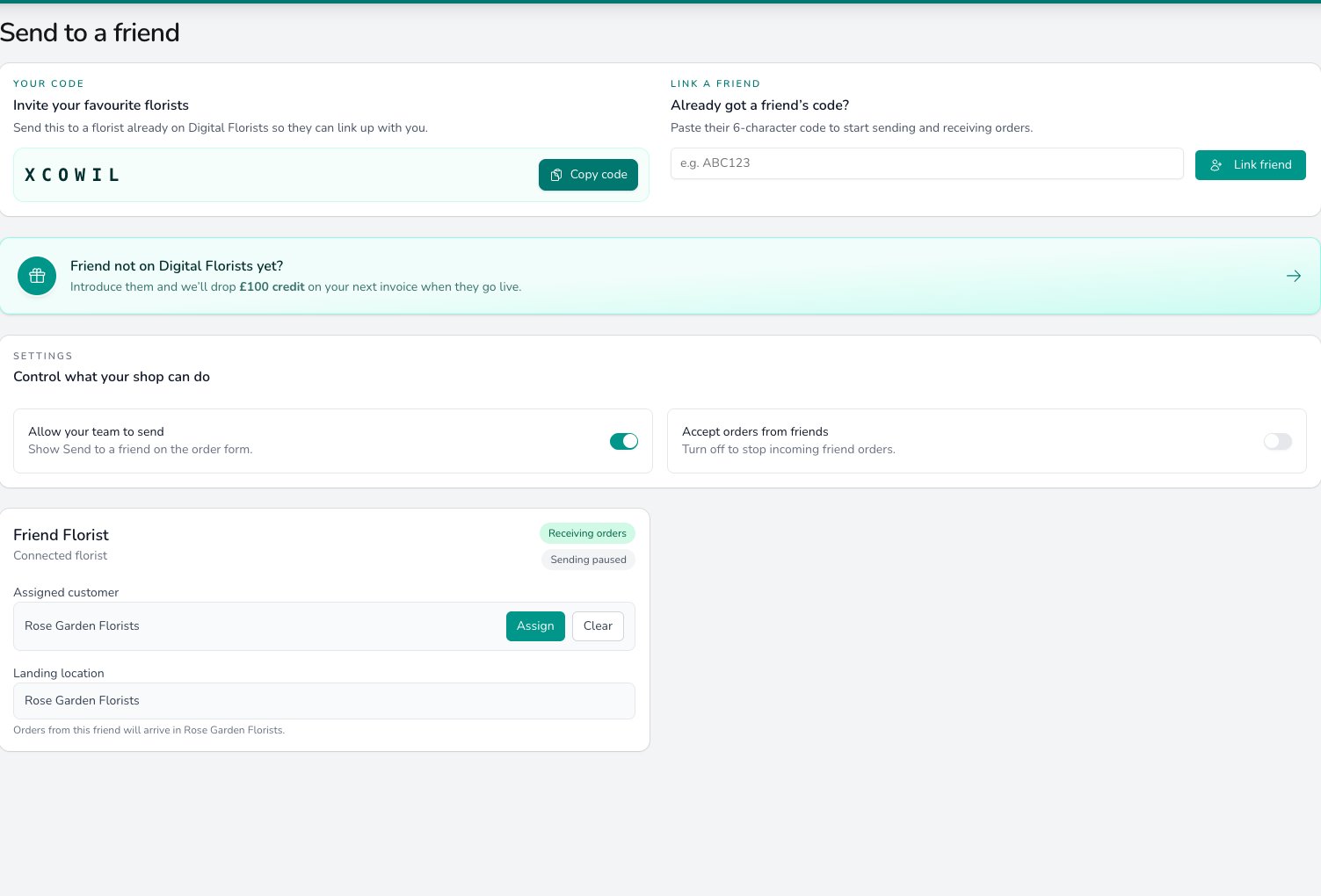
Share your code or paste a friend's to link shops, then control whether your team can send and whether friend orders are accepted.
- Click Copy code and share it with the florist you want to partner with.
- When they share their code with you, paste it under Link a friend and click Link friend.
Sending orders
Turn on Allow your team to send and Send to a Friend appears as a relay option on the order form. When taking an order:- Start a new order and choose Send to a Friend as the relay provider.
- Pick the partner florist you want to fulfil it.
- Add the products you’re sending with the Add Product button. The list offers a small set of designer’s-choice handtieds at set budgets (Standard, Luxe, or Wow) plus optional finishing touches. The partner florist designs to the budget you pick.
- Add the recipient, address, delivery date, and any notes, then confirm.
Receiving orders
Turn on Accept orders from friends to receive orders from your partners. Turn it off and incoming friend orders stop. On each connected florist’s card you choose:- Assigned customer. Click Assign and pick the customer record incoming orders are attached to. This is usually a generic “Send to a Friend” customer you’ve created, or the partner shop itself. Clear removes the choice.
- Landing location. Which of your shops the order should land in. If you only have one location, it’s set for you.
If a partner sends you an order before you’ve set an assigned customer for them, it won’t come through. Set the customer first, then ask them to resend.
The connected florist cards
Each linked florist’s card shows two status pills:- Receiving orders or Not receiving, whether they’re currently accepting orders from you.
- Can send to them or Sending paused, whether you’re currently allowed to send.
Common questions
Is this the same as Direct2Florist?
Is this the same as Direct2Florist?
No. Direct2Florist is a separate paid relay network with its own page under Settings > Advanced. Send to a Friend is an arrangement between specific florists who already know each other and both use Digital Florists.
How does payment work?
How does payment work?
Digital Florists doesn’t handle the inter-florist money. Your customer pays you for the full order at the point of sale; you settle directly with your partner (account, bank transfer, whatever you agree).
What if I want to stop working with a partner?
What if I want to stop working with a partner?
Turn off Allow your team to send to stop new outgoing orders, or Accept orders from friends to stop incoming. To remove a link entirely, get in touch and we’ll clear it on our side.
What products can I send?
What products can I send?
When you add products to a Send to a Friend order, the Add Product button offers a small set of designer’s-choice handtieds at set budgets (Standard, Luxe, or Wow) plus optional finishing touches. The partner florist designs to the budget you pick.
What’s next?
Creating an order
Take the order and choose Send to a Friend as its relay option.
Relay integrations
The relay networks you can connect alongside Send to a Friend.