

This page covers features gated by Admin-tier permissions — typically Settings access. Admins have these by default; your administrator can adjust who has them in Settings > Team.
Setting up the scheme
Go to Settings > Storefront > Loyalty. The settings sit in four cards, with a What customers get summary above them that describes your scheme back to you in plain words as you change it.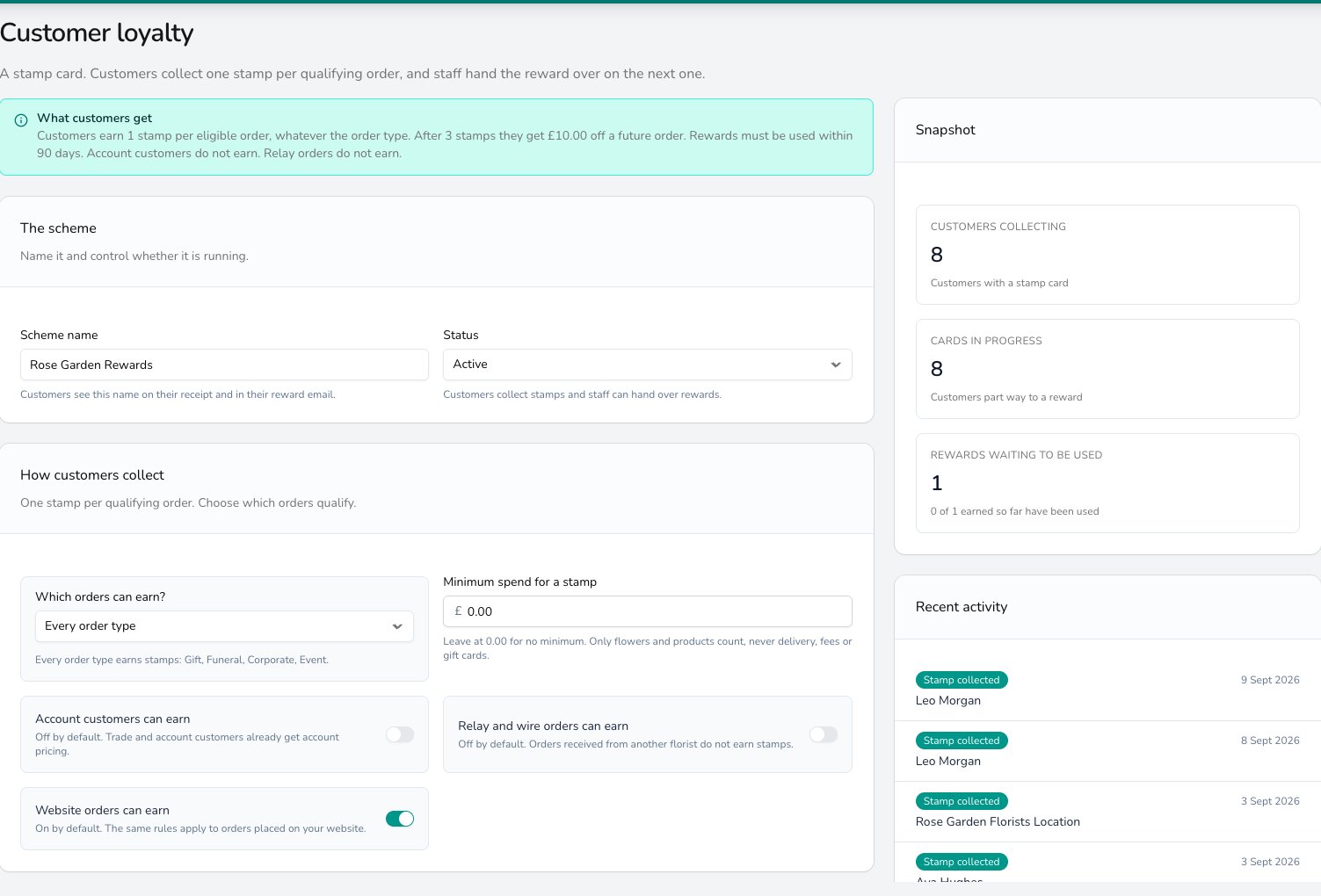
The rules customers earn under on the left, and live collection numbers and recent stamps on the right.
The scheme
- Scheme name: what customers see on their receipt and in their reward email.
- Status: Draft while you set up, Active once customers should collect, Earning paused to stop new stamps while rewards already earned can still be used, and Closed to stop everything.
How customers collect
- Which orders can earn?: leave it on Every order type, or choose Only the order types I tick and pick from Gift, Funeral, Corporate and Event.
- Minimum spend for a stamp: how much an order has to come to before it earns. Leave it at 0.00 for no minimum. Only flowers and products count towards it, so delivery, fees and gift cards are left out.
- Account customers can earn: whether trade and account customers collect stamps. Off to start with.
- Relay and wire orders can earn: whether orders you take in from another florist collect stamps. Off to start with.
- Website orders can earn: whether orders from your website collect stamps. On to start with.
What they get
- Stamps needed for a reward: how many stamps fill a card.
- Reward value: what a full card is worth. It comes off flowers and products, not delivery or gift cards.
- How you describe it to customers: the wording they read, for example £10 off a future order.
Advanced
Most shops leave this card alone.- Minimum order to use a reward: the smallest order a reward can be spent on.
- Rewards expire: off to start with, so a reward stays usable until it’s spent. Turn it on and enter Days to use a reward.
- Customers can hold more than one reward: on to start with. Turn it off and a full card waits its turn until the reward they’re holding has been used.
When you change any of these rules, the change applies to orders from that point on. Stamps your customers have already collected and rewards they’ve already earned stay exactly as they are.
How a customer earns a stamp
Take an order with the customer on it, then mark it delivered or collected and take the payment. The stamp lands once the order has been both fulfilled and paid in full. If you take the order back out of Fulfilled, the stamp comes back off until it’s settled again. Only the flowers and products on the order count towards your minimum spend. Delivery charges, fees and gift cards are left out of that figure. When a customer’s last stamp lands, their reward is recorded against their account ready for their next order.Loyalty codes and the reward email
Start a customer collecting and they get a short code of their own. You’ll see it print on their receipt, next to how many stamps they’ve collected so far. It also arrives in their reward email as text and as a picture their phone can scan. Go to Settings > Advanced > Notifications, turn on When a customer earns a loyalty reward, and a full card then emails the customer their reward and their code. If they lose that email, open their customer profile and click Email the reward again on the Loyalty tab. See Notifications for how notifications are switched on and who gets them.Scanning a loyalty code doesn’t spend anything. It tells your till who the customer is, and your team still puts the reward on the order.
Giving a reward to a customer
Open an order or start a sale with the customer on it, and the loyalty panel tells you what they’re holding. Click Redeem and the reward drops onto the order as its own Loyalty Reward line, so the money off is there in black and white on the order and on the invoice. A few things to know before you promise one across the counter.- Take any promotion off the order first, because a reward and a promotion can’t be used together.
- Only one reward goes on an order.
- If you’ve set a minimum order to use a reward, the button stays greyed out until the order reaches it.
- If you take the reward line back off a saved order, the reward returns to the customer to use another time.
Seeing how the scheme is doing
Open Settings > Storefront > Loyalty and look at the Snapshot panel on the right. It counts how many customers are collecting, how many cards are part way there, and how many rewards are waiting to be used. Recent activity underneath lists the latest stamps and rewards as they happen. To check one customer, open their profile and use the Loyalty tab. See Customers.Bringing an existing scheme across
If you’ve edited any of your order emails or texts by hand, open each one and replace its loyalty wording. Delete the old loyalty lines, then insert the current loyalty variables from the variable picker in the template editor. See Notification templates.Common questions
Nobody is collecting stamps. Why?
Nobody is collecting stamps. Why?
Open Settings > Storefront > Loyalty and check the Status. A scheme left on Draft or Earning paused collects nothing, so set it to Active. If the status is right, check the order’s type against Which orders can earn?, and check that its flowers and products reached your Minimum spend for a stamp.
Do rewards expire?
Do rewards expire?
Only if you turn on Rewards expire and give it a number of days. Left off, a reward stays usable until the customer spends it.
Can I pause the scheme without losing anything?
Can I pause the scheme without losing anything?
Yes. Set the Status to Earning paused and no new stamps are collected, while rewards customers already hold can still be handed over. Closed stops those too.
What happens if an order is cancelled after a stamp was earned?
What happens if an order is cancelled after a stamp was earned?
The stamp comes back off when the order leaves Fulfilled, and lands again if you reopen the order and settle it. A reward that had been spent on that order goes back to the customer.
A customer has a retired points balance. Can they spend it?
A customer has a retired points balance. Can they spend it?
No. It’s on their Loyalty tab as a record of what they’d collected under a points scheme. If you want to honour it, put the goodwill on their next order as a discount yourself.
Can a customer use a reward and a promotion together?
Can a customer use a reward and a promotion together?
No. Take the promotion off the order first, then apply the reward.
What’s next?
Customers
Stamps, rewards and loyalty codes on a customer’s profile.
Point of Sale
Find a customer by loyalty code and take a reward off a sale.
Notifications
Turn on the reward email and choose who gets it.
Gift Cards
Sell gift cards alongside your stamp card.