

This page covers features gated by Manager-tier permissions. Managers and Admins have these by default; your administrator can adjust who has them in Settings > Team.
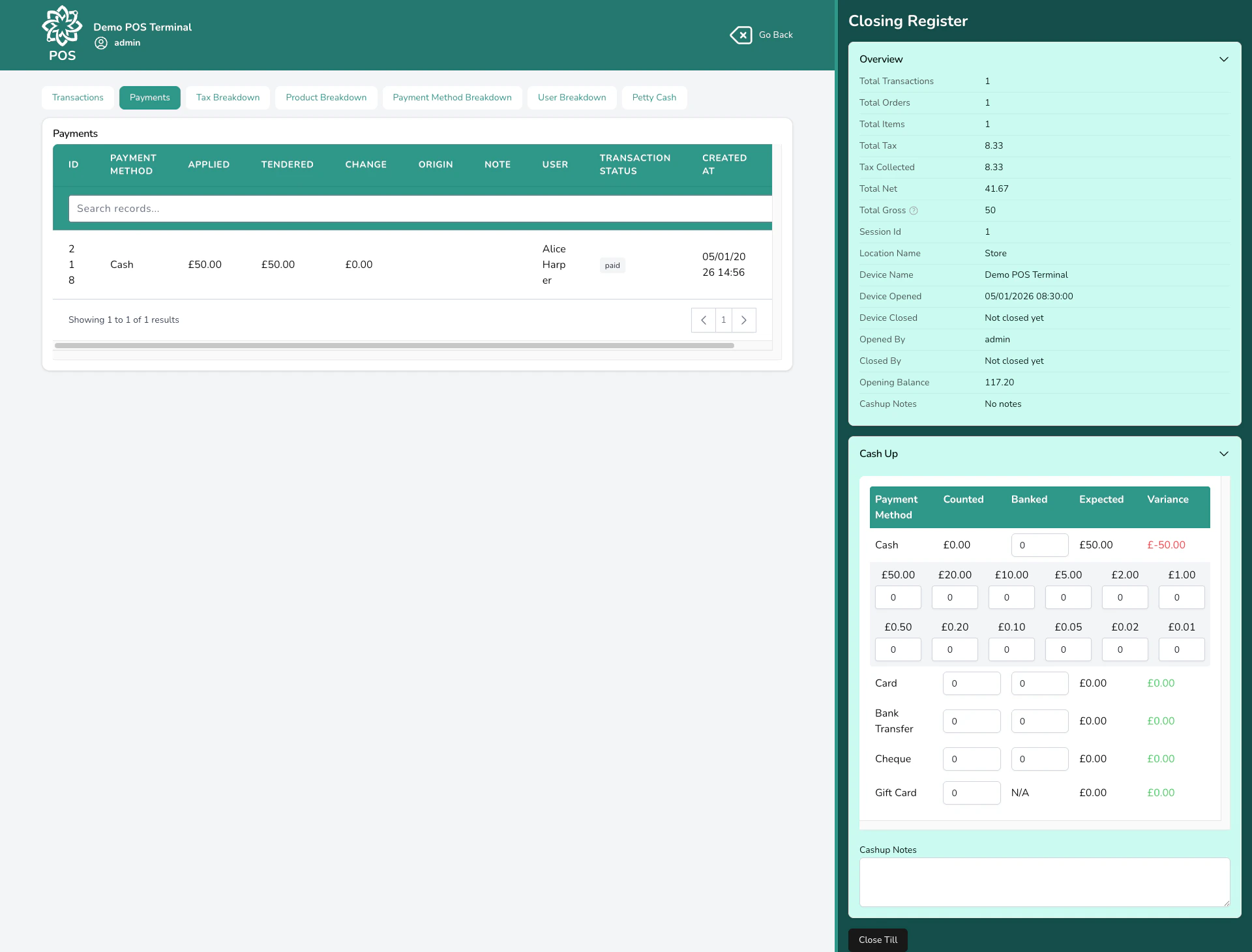
The End of Day screen with session summary
Closing the till
From the POS, click the settings icon and choose Close Register, or navigate directly to the End of Day screen.1
Count your cash
Count all the cash in your drawer. If is enabled, enter the number of each coin and note — the total is calculated for you. Otherwise, enter the total amount directly.
2
Enter counted and banked amounts
For each payment method, enter two numbers:
- — the total you have on hand (for cash, this comes from your denomination count)
- — the amount you’re putting in the safe or taking to the bank
3
Record petty cash (if applicable)
If you made any petty cash movements during the session, they’ll be shown here. The net petty cash (in minus out) adjusts the expected cash amount, so your count should still balance.
4
Add notes (optional)
Use the notes field to record anything unusual — for example, “£5 short, possible miscounted change” or “Paid window cleaner £15 from till”.
5
Close the session
Click Close Till to end the session. A (session summary receipt) opens automatically for printing. You’re redirected to the full End of Day report.
You can close the till even if there’s a variance. Discrepancies are logged but don’t block you from closing. Use the notes field to explain any differences.
The variance grid
The heart of the End of Day screen is the — a row for each payment method showing:
The variance is colour-coded so you can spot problems at a glance. If everything balances, you’ll see zeros across the board.
Product Category Breakdown
Open the Product Category Breakdown tab to see the session split by product category. Each row gives you the net, tax and gross for one category, in the same order your categories sit in your own list. The same breakdown prints on the end of day report, so you can hand it to whoever does your books.These figures cover products only, and each product counts once under the category you set as its main one. Delivery charges are left out, so the breakdown won’t add up to the total you cashed up.
Checkouts with no payment
If a sale was started but never paid for, you’ll find it listed on the End of Day screen with the time it was created and what it came to. Open it to review the transaction, or click Void to cancel it along with its orders and tasks. Closing the till doesn’t clear these, so deal with them while you’re here. Click Void on one that can’t be cancelled and the message tells you why.- The checkout is already voided.
- One of its orders has been fulfilled. Take that order back out of Fulfilled first.
- It carries refund or gift-card payment history, so it has to be unpicked on the transaction rather than voided.
Petty cash
If is enabled on your device, you can record small cash movements during your session — like paying a supplier in cash, topping up the stamp fund, or receiving cash from another till. Record each movement with the amount, direction, and a category. You can attach a photo of the receipt. Petty cash movements are factored into your expected cash amount at close. If you took £20 out for milk and stamps, your expected cash will be £20 lower — so your count should still balance.To review past sessions, run date-range reports, or export EOD data, see End of Day Reports.
Common questions
Can I close the till if there's a discrepancy?
Can I close the till if there's a discrepancy?
Yes. Variances are recorded but don’t block you from closing. Add a note explaining the difference. If discrepancies are frequent, check that all cash refunds and petty cash movements are being recorded.
Can someone else close the till?
Can someone else close the till?
Yes. Both who opened and who closed the session are recorded. A shift handover mid-day is fine.
What's the difference between Counted and Banked?
What's the difference between Counted and Banked?
Counted is the total you have on hand for that payment method. Banked is how much you’re depositing or putting aside. For example, you might count £500 in cash but only bank £400, keeping £100 as tomorrow’s float.
Do card payments need to be counted?
Do card payments need to be counted?
Yes, worth doing. Card takings at the till are whatever your team keyed in after taking the payment on your own card terminal. A payment taken on a connected Dojo terminal records itself. Counting card means checking that figure against your terminal’s own end-of-day total, and a mis-keyed card sale shows up nowhere else.
What if I forgot to record a petty cash movement?
What if I forgot to record a petty cash movement?
Your expected cash will be off by that amount, showing a variance. You can add a note when closing to explain it. For future reference, record petty cash movements as they happen so your count balances at the end of the day.
Can I reopen a closed session?
Can I reopen a closed session?
No. Once a session is closed, it’s final. If you need to make a correction, open a new session and process an adjustment. The audit trail preserves both the original close and the correction.
Where do I find the Z-Report?
Where do I find the Z-Report?
The Z-Report prints automatically when you close the till. You can also view and reprint it from the session’s End of Day report in Analytics > Reports > EOD Reports.
What’s next?
Point of Sale
Back to the main POS guide.
Refunds
Process refunds at the till.
Analytics
See your POS data alongside other business metrics.
Reports
Export your financial data for accounting.