

This page covers features gated by Admin-tier permissions — typically Settings access. Admins have these by default; your administrator can adjust who has them in Settings > Team.
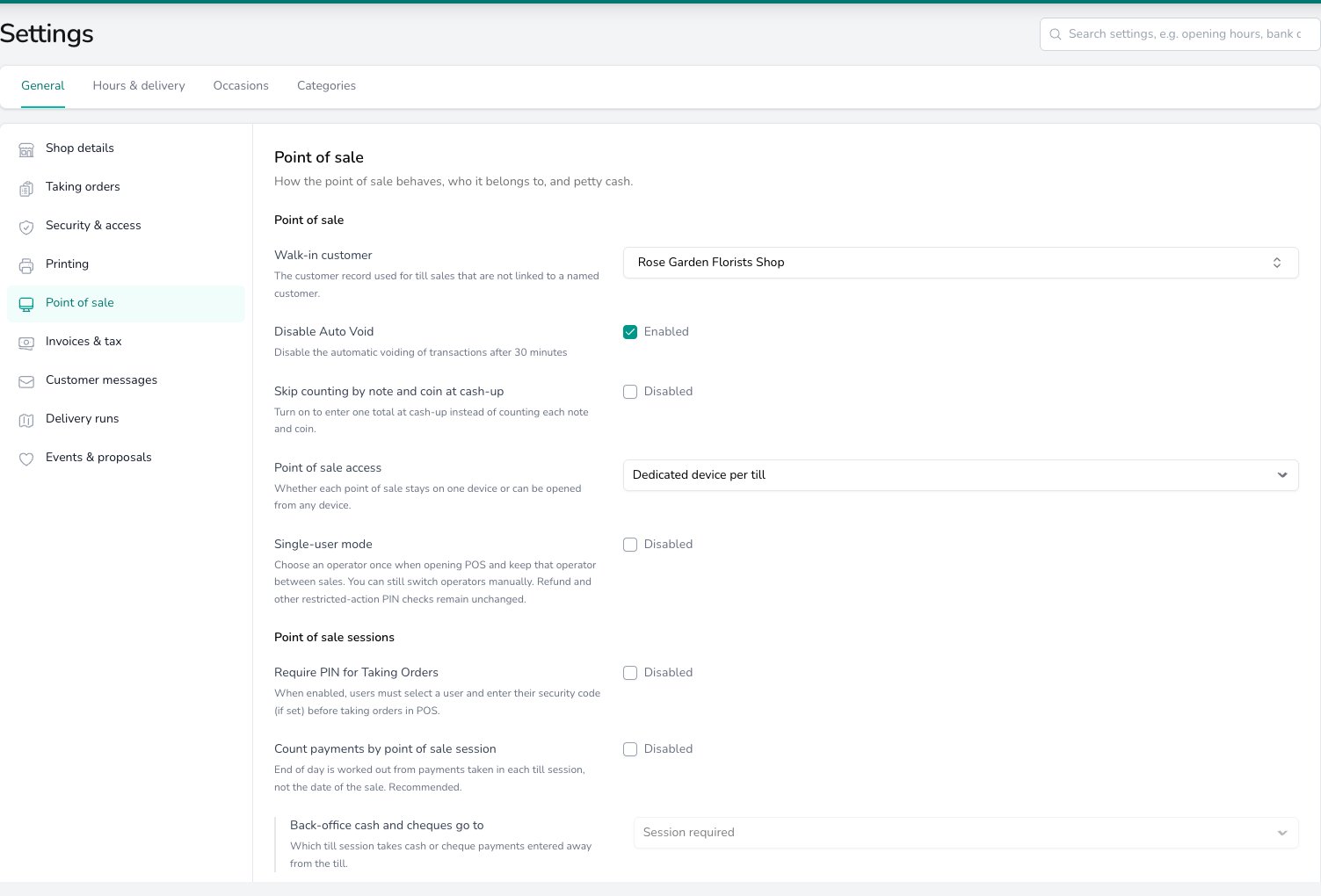
Point of sale settings: the walk-in customer, auto void, cash-up counting, device access and single-user mode, followed by the PIN and till session choices each shop makes for itself.
Point of sale
Pick a Walk-in customer and every till sale that isn’t linked to a named customer is recorded against that record. Leave Disable Auto Void on and an unpaid till sale stays open until your team voids it. Turn it off and a sale left unpaid for 30 minutes is voided on its own. Turn on Skip counting by note and coin at cash-up and your team types one cash total when they open and close the till. Leave it off and they count each note and coin, and the total is worked out for them. See End of Day. Point of sale access decides which device can open a till. Dedicated device per till keeps each till on the device it was registered on, and other devices see it greyed out. Allow any device to use any till lets any device open any till. See Devices for registering a till. Turn on Single-user mode and your team chooses the operator once when they open the till and keeps them for every sale. They can still switch operator by hand, and PIN checks for refunds and other restricted actions still apply. See Point of Sale.Point of sale sessions
Turn on Require PIN for Taking Orders and your team picks their name and enters their security code, if they have one, before taking an order at the till. Turn on Count payments by point of sale session and End of Day is worked out from the payments taken in each till session, not the date of the sale. Three more choices then apply.- Back-office cash and cheques go to decides where a cash or cheque payment recorded away from the till lands. Session required keeps it out of every till session, so cash and cheques only count towards a session when they’re taken at the till. Auto if single adds it to the one open session, as long as only one is open at that shop. Auto to primary adds it to the session open on your main point of sale.
- Main point of sale is the till that back-office cash and cheques are counted against at cash-up.
- Take payments with no point of sale session open lets your team take a payment by order number when no till session is open. The payment is added to the next session.
Common questions
Why can't my team open a till on a different device?
Why can't my team open a till on a different device?
Point of sale access is set to Dedicated device per till, so each till only opens on the device it was registered on. Switch to Allow any device to use any till if your team moves between devices, or register the second device as its own till under Devices.
Do these settings apply to every shop?
Do these settings apply to every shop?
The Point of sale card does. The Point of sale sessions card is set per shop, so a shop with one till can send back-office cash to it automatically while another with three keeps Session required.
What’s next?
Point of Sale
Opening the till, building a sale and taking payment.
End of Day
Closing the till, counting cash and reviewing the day’s takings.
Devices
Register tills, set their printers and petty cash, and run several tills in one shop.
Payment Methods
What each payment method does at the till and on an order.